Step 9 — Telegram Bot Notifications
1. Scope
A Telegram bot informs the team about two categories of event: infrastructure health (nodes going down and coming back up) and threats or other events detected by the sensor node(s).
| Component | Technology | Function |
|---|---|---|
| Bot | Telegram Bot API, bot @Nodegroup8bot |
Delivers messages to the team chat |
| Trigger logic | FastAPI (backend/api/main.py) |
Decides when to send, applies per-rule cooldowns |
| Rule state | MongoDB alert_rules collection |
Persists which rules are enabled and their trigger counts |
| Message log | MongoDB notifications collection |
Every message actually sent, surfaced on the frontend |
| Health polling | asyncio background task in the FastAPI process |
Watches Prometheus up metric every 30s for state changes |
Both trigger paths funnel through one shared send_telegram_message() function, so rule-checking, cooldown, and logging behavior is identical regardless of what triggered the alert.
2. Bot setup
- Created via @BotFather (
/newbot) — bot usernameNodegroup8bot. -
The bot token and the target chat ID are kept out of the repository entirely, in
backend/.env(gitignored), and referenced bybackend/docker-compose.yml: -
The chat ID is not the recipient's phone number — Telegram's
sendMessageAPI addresses achat_id, not a phone number. It was obtained by having the recipient message the bot once, then reading it back viaGET https://api.telegram.org/bot<token>/getUpdates. - On FastAPI startup, a real
getMecall against the Telegram API confirms the bot is reachable and sets abotStatus(online/offline/error) that the frontend displays — this is not a hardcoded "online" indicator.
3. Two real, independently-toggleable alert rules
Rather than a fixed list of hardcoded trigger conditions, rules live in MongoDB and are checked before every send:
| Rule | Condition | Severity |
|---|---|---|
threat_detection |
threat_level == "high" on an ingested detection event (fire, smoke, or weapon) |
critical |
node_health |
A node's Prometheus up value flips 0→1 or 1→0 |
warning |
Each rule tracks enabled, triggered_count, and last_triggered in Mongo, exposed via:
GET /notifications/rules— list rules with real countsPOST /notifications/rules/{id}/toggle— flipenabled, persisted immediately
send_telegram_message() checks is_rule_enabled(rule) before doing anything else — if a rule is toggled off from the frontend, that category of alert stops firing immediately, not just visually.
4. Spam prevention
The sensor camera can produce many detections in a short window (e.g. repeated misclassifications while pointed at a static object). Every send goes through a per-key cooldown (TELEGRAM_COOLDOWN_SECONDS = 60) keyed by sensor_id + detected class(es) for threats, or by node instance for down-alerts — so a misfiring sensor cannot flood the chat. "Back online" messages are intentionally not cooldown-gated, since a node recovering is a low-frequency, high-value event.
5. Message log surfaced on the frontend
Every message that actually reaches Telegram (HTTP 2xx from the Bot API) is written to a notifications collection — text, timestamp, severity, related node/sensor, and image URL if the triggering event had a snapshot. GET /notifications serves this to the Notifications page's "Telegram Feed" panel, which polls every 5s.
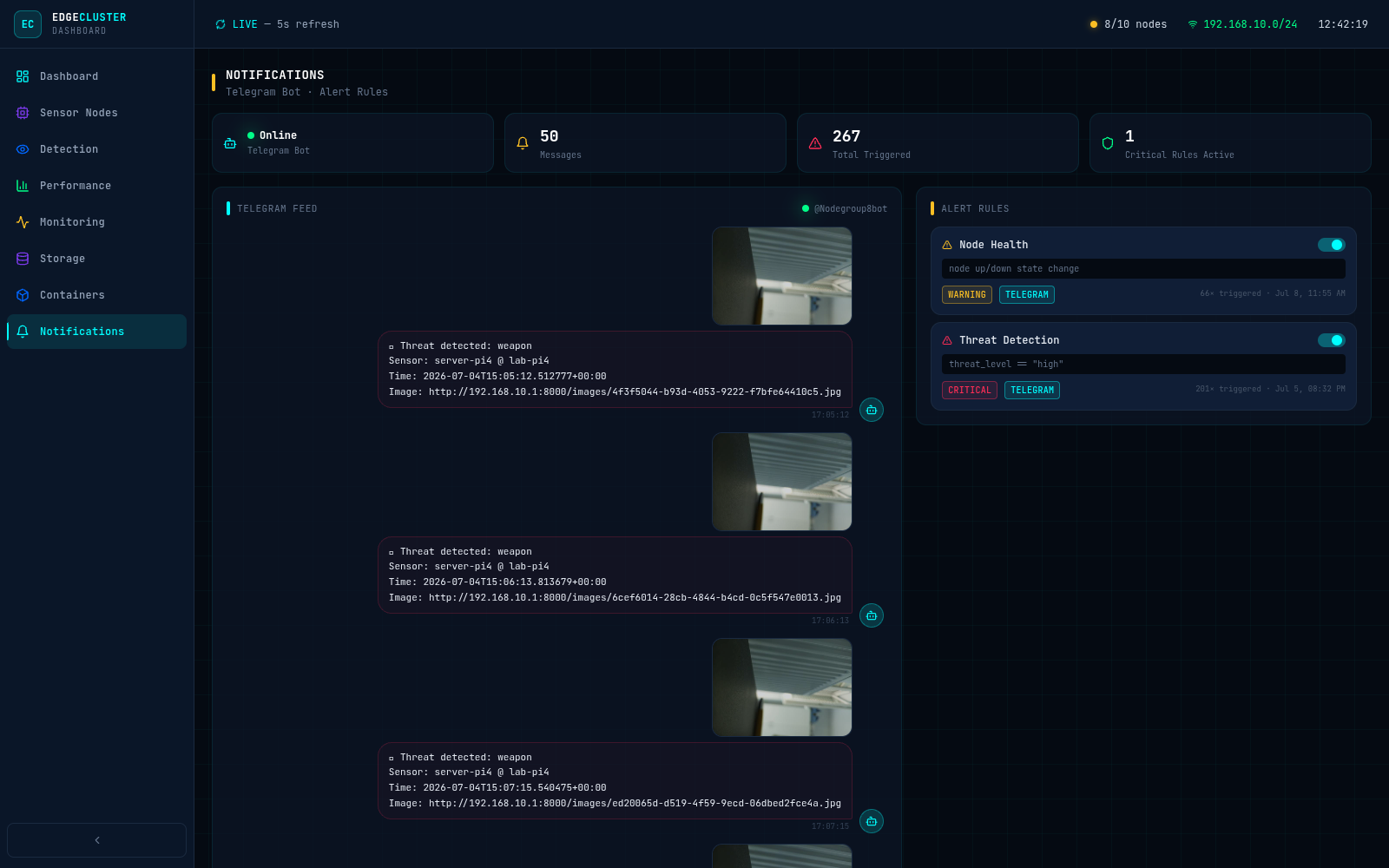
6. Verification
Both trigger paths were verified against the live cluster:
- Threat detection: a high-threat detection event sent to
POST /eventsis delivered to the team Telegram chat within seconds, and the corresponding rule'striggered_countincrements. - Node health: taking a worker node's
node_exporteroffline produces a "🔴 Node down" alert once Prometheus and the 30-second poll catch the transition; bringing it back online produces a "✅ Node back online" alert. - Rule toggle: disabling a rule from the frontend stops that category of alert from firing immediately.