Step 7 — Backend Development and Distributed Storage
1. Scope and cluster architecture
The objective was to implement a robust data management and ingestion pipeline to capture, decode, catalogue, and shard real-time edge-AI threat event metadata and high-resolution camera binaries across the cluster.
| Layer Component | System Technology | Function |
|---|---|---|
| Ingestion Interface | FastAPI (Python 3.10) | Processes incoming REST payloads and routes binaries |
| Metadata Catalog | MongoDB 7.0 | Stores persistent JSON detection parameters and file paths |
| Object Storage Engine | SeaweedFS (v3.0) | Manages distributed file allocations and tracking blocks |
| Local FUSE Mount | FUSE Driver File Bridge | Maps the cluster filer to a standard directory at /data/images |
| Worker Volume Nodes | 8 × Raspberry Pi 3 Workers | Provide physical SD card storage partitions |
FastAPI decouples metadata writes to MongoDB from binary streams to the SeaweedFS FUSE mount. SeaweedFS distributes blobs across the Pi 3 worker SD cards over gRPC (port 19333).
2. Final design decisions
Dual-Port Routing Isolation
To prevent ingestion bottlenecks, SeaweedFS separates the metadata handling channel from the massive binary storage streams. The Master web dashboard serves status lookups on HTTP port 9333, while all internal storage allocation and block synchronization are handled over a dedicated, low-latency gRPC channel on port 19333.
Lazy Allocation Storage Pools
Rather than pre-allocating large, empty storage files on the worker SD cards on boot, the system utilizes lazy block initialization. Individual 1 GB data buckets are generated only when the incoming camera traffic requires a new block allocation.
3. Sub-Task 7a: Application Communication Architecture
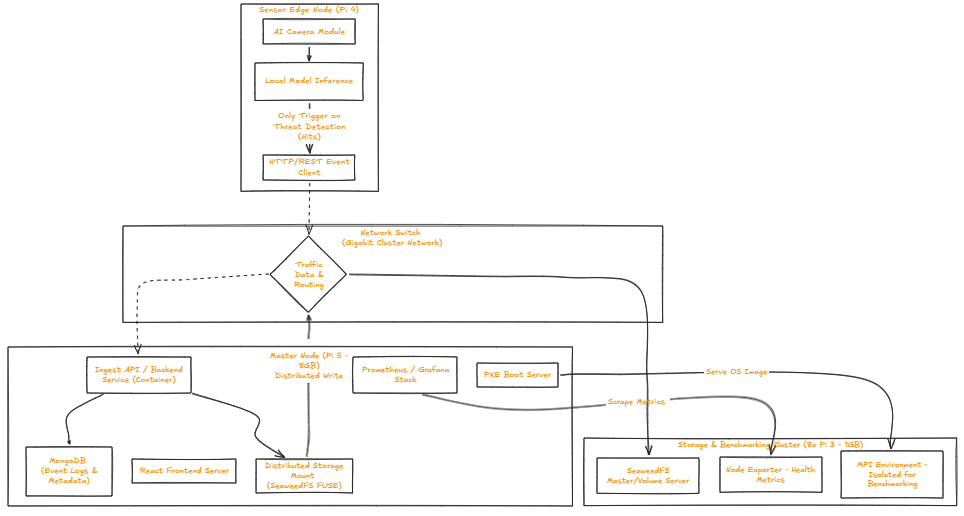
The system communication pipeline operates on a decoupled REST ingestion model designed to protect backend availability from network lag or camera processing delays:
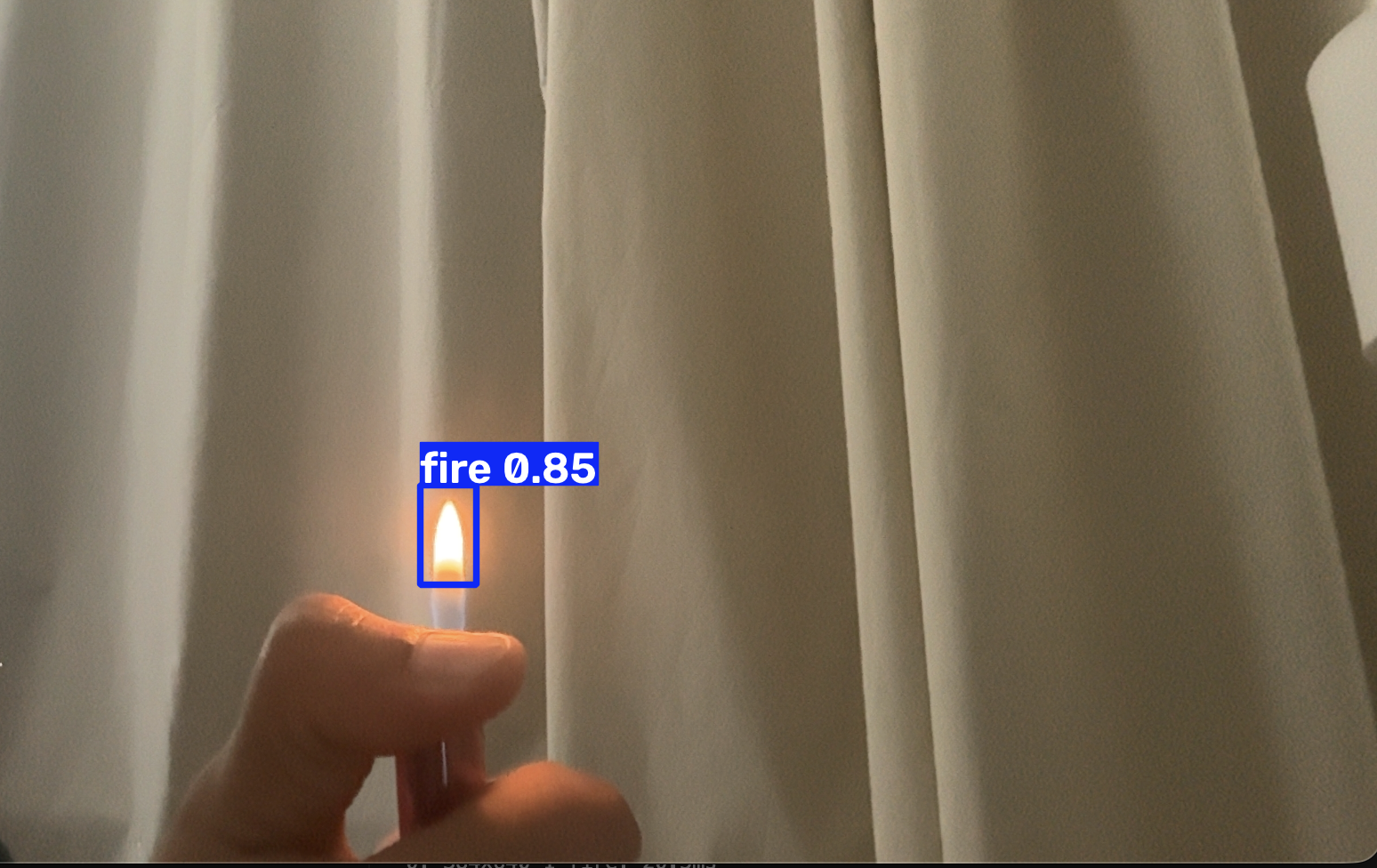
- Inference Handshake: The Pi 4 Sensory Node runs local YOLO inference. When a target matches a threat classification, it bundles the detection metrics (bounding boxes, classifications, scores) with a base64-encoded string of the frame.
- REST Processing: The payload is sent via an HTTP POST request to the FastAPI gateway on the Pi 5 (
/events). - Decoupled Writing: FastAPI converts the base64 string back into raw binary bytes. It streams this stream directly to the local FUSE mount folder at
/data/images. Concurrently, it creates a persistent event record inside MongoDB, mapping the absolute file path to the corresponding metadata object. - Client Interface Delivery: The user interface polls the backend API at a configured refresh rate via
GET /events, reading directly from MongoDB and fetching files seamlessly through the mapped FUSE image router.
4. Sub-Task 7b: Sensor Inference and REST API
4.1 Ingestion Mechanism Design
The backend application layer binds to host port 8000 via an asynchronous Uvicorn framework. Pydantic models validate the incoming JSON arrays to verify schema integrity before executing memory allocations. When a base64 frame stream hits the API, the ingestion module utilizes Python's native decoding engine to convert the text string back into standard binary bytes, evaluates the payload size, and writes the stream using asynchronous file handling to avoid blocking incoming requests.
To optimize query speeds during frontend long-polling, MongoDB collections are structured with a descending index on the timestamp field. This indexing ensures that paginated lookup loops perform an index-scan rather than a full collection-scan, maintaining real-time frontend responses as event records accumulate.
4.2 API Endpoints
| Method | Endpoint | Description |
|---|---|---|
GET |
/events?page=1&limit=5 |
Paginated detection events |
GET |
/events/{id} |
Single event detail |
GET |
/images/{filename} |
Serve stored image |
POST |
/events |
Ingest new detection event |
4.3 Example Ingestion Schema Response
{
  "page": 1,
  "limit": 5,
  "total": 126,
  "total_pages": 26,
  "items": [
    {
      "event_id": "37abc37d-...",
      "timestamp": "2026-06-17T17:44:18+00:00",
      "sensor_id": "server-pi4",
      "location": "lab-pi4",
      "model_version": "yolo11n-imx500-v1",
      "detections": [
        { "class": "weapon", "score": 0.73, "box": [0, 0, 639, 479] }
      ],
      "threat_level": "high",
      "snapshot_url": "/images/37abc37d-....jpg",
      "snapshot_size_bytes": 17379
    }
  ]
}
(For the complete, copy-pasteable FastAPI production script, see Appendix A.)
5. Sub-Task 7c: Distributed Storage Implementation
Unless stated otherwise, execute all commands from your terminal connection on the Pi 5 Master (server-pi5).
5.1 Structure the Master Container Deployment Block
Open your primary configuration manifest at /home/docker-compose.yml and add the SeaweedFS services using explicit IP bindings:
services:
  seaweedfs-master:
    image: chrislusf/seaweedfs:latest
    container_name: seaweedfs-master
    restart: unless-stopped
    network_mode: host
    command: master -ip=192.168.10.1 -port=9333

  seaweedfs-filer:
    image: chrislusf/seaweedfs:latest
    container_name: seaweedfs-filer
    restart: unless-stopped
    network_mode: host
    command: filer -master=192.168.10.1:9333 -port=8888
    depends_on:
      - seaweedfs-master
Reproducibility trap
The -ip option must specify the Master's real network interface IP (192.168.10.1). Setting this option to localhost or 127.0.0.1 causes the master to advertise loopback routes to the workers. The worker volume daemons will then try to register against themselves, causing data storage allocations to fail completely.
5.2 Automate Worker Volume Allocations Over PXE
- Open the shared filesystem initialization script on the Master:
- Add the storage mounting and volume allocation commands directly above the telemetry setup lines:
# Force physical SD card partition mounting, fallback gracefully on failure
sudo mount /dev/mmcblk0p2 /mnt/sdcard || true

# Execute the local SeaweedFS volume daemon pointing to the Master cluster IP
/usr/bin/weed volume -mserver=192.168.10.1:9333 -dir=/mnt/sdcard -port=8080 > /dev/null 2>&1 &
- Save the changes and exit (
Ctrl+O,Enter,Ctrl+X).
5.3 Configure the Transparent FUSE System Mount
To map the distributed SeaweedFS layer into standard Linux file operations, initialize the FUSE file bridge inside the local directory structure:
# Clear any stalled mount endpoints
sudo pkill -f "weed mount"

# Open the physical directory entry path
sudo mkdir -p /data/images

# Mount the virtual filesystem handler in the background
sudo /usr/local/bin/weed mount -filer=127.0.0.1:8888 -dir=/data/images -allowOthers &
6. Verification and cluster validation
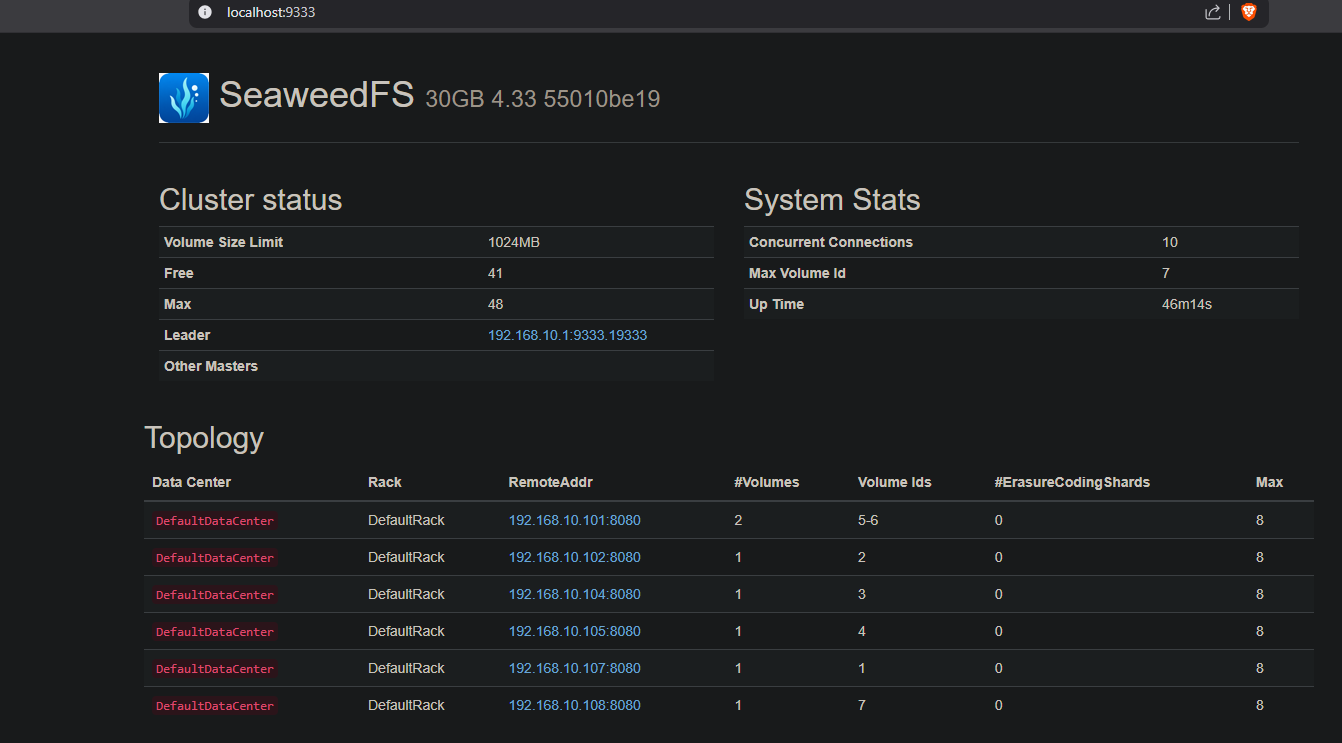
6.1 Checking Cluster Topology Maps
Open an external browser window and navigate to the Master dashboard endpoint:
Expected Output: The Topology map table will automatically populate with active worker nodes (192.168.10.101:8080 to .108). The capacity pools will show a total cluster capacity value of 48 slots (6 active nodes × 8 default slots per node), indicating that the physical storage is successfully pooled across the network switch.
6.2 Verifying Distributed Sharding Behavior
To trace exactly how the system distributes image data across the worker node array, open the cluster shell on the Master:
Inside the interactive command prompt, execute the cluster inventory tool:
Expected Output:
DataNode 192.168.10.102:8080 hdd(volume:1/8 active:1 free:7)
  volume id:2 size:47064 file_count:3 version:3
DataNode 192.168.10.104:8080 hdd(volume:1/8 active:1 free:7)
  volume id:3 size:47456 file_count:3 version:3
The output confirms that raw images written to /data/images bypass the local server storage entirely, with individual binary files automatically sharded onto separate physical hardware nodes.
7. Results
The distributed storage pipeline is operational across the cluster, actively decoding frames, cataloging detection entries into MongoDB, and sharding image blocks across the active compute node array.
8. Critical findings and reproducibility traps
The gRPC Port Blockade Trap
When running SeaweedFS within Docker containers using network_mode: host, all ports are exposed directly to the network interface. However, if you switch your deployment file to bridge networking (ports: mapping syntax), you must explicitly map both the base HTTP port (9333:9333) and the internal cluster gRPC channel (19333:19333). Leaving port 19333 unmapped allows workers to handshake initially, but prevents them from registering their volume spaces, keeping the cluster topology map empty.
The FUSE Mount Shadow Illusion
If you start your FastAPI ingestion container before initializing the background weed mount filesystem bridge, Docker creates a standard local folder on the Master disk at /data/images. When the camera node streams images, they are written to the local disk instead of the cluster storage pool. Always ensure the virtual mount bridge is initialized before launching application services.
9. Complete configuration files
Master Storage Stack Manifest Block
Excerpt from the core deployment manifest located at /home/docker-compose.yml:
services:
  edge-api:
    image: python:3.10-slim
    container_name: edge-api
    restart: unless-stopped
    network_mode: host
    volumes:
      - ./app:/app
      - /data/images:/data/images
    working_dir: /app
    command: sh -c "pip install fastapi uvicorn pymongo motor && uvicorn main:app --host 0.0.0.0 --port 8000"
    depends_on:
      - edge-mongo

  edge-mongo:
    image: mongo:7
    container_name: edge-mongo
    restart: unless-stopped
    network_mode: host
    volumes:
      - /home/server-pi5/database_data:/data/db

  seaweedfs-master:
    image: chrislusf/seaweedfs:latest
    container_name: seaweedfs-master
    restart: unless-stopped
    network_mode: host
    command: master -ip=192.168.10.1 -port=9333

  seaweedfs-filer:
    image: chrislusf/seaweedfs:latest
    container_name: seaweedfs-filer
    restart: unless-stopped
    network_mode: host
    command: filer -master=192.168.10.1:9333 -port=8888
    depends_on:
      - seaweedfs-master
10. Appendices
Appendix A: FastAPI Ingestion App Implementation File
Save the following application code block as /home/app/main.py on the Pi 5 Master node:
import os
import uuid
import base64
from datetime import datetime, timezone
from fastapi import FastAPI, HTTPException, Query
from fastapi.staticfiles import StaticFiles
from pydantic import BaseModel, Field
from motor.motor_asyncio import AsyncIOMotorClient

app = FastAPI(title="SentriPi Ingestion Gateway")

IMAGE_DIR = "/data/images"
mongo_client = AsyncIOMotorClient("mongodb://127.0.0.1:27017")
db = mongo_client["sentripi_database"]
events_collection = db["detection_events"]


class DetectionItem(BaseModel):
    class_name: str = Field(alias="class")
    score: float
    box: list[int]


class EventIngestPayload(BaseModel):
    sensor_id: str
    location: str
    model_version: str
    detections: list[DetectionItem]
    threat_level: str
    snapshot_base64: str


app.mount("/images", StaticFiles(directory=IMAGE_DIR), name="images")


@app.on_event("startup")
async def create_indexes():
    await events_collection.create_index([("timestamp", -1)])


@app.post("/events")
async def ingest_detection_event(payload: EventIngestPayload):
    try:
        event_uuid = str(uuid.uuid4())
        filename = f"{event_uuid}.jpg"
        absolute_filepath = os.path.join(IMAGE_DIR, filename)

        binary_data = base64.b64decode(payload.snapshot_base64)
        size_bytes = len(binary_data)

        with open(absolute_filepath, "wb") as f:
            f.write(binary_data)

        event_document = {
            "event_id": event_uuid,
            "timestamp": datetime.now(timezone.utc).isoformat(),
            "sensor_id": payload.sensor_id,
            "location": payload.location,
            "model_version": payload.model_version,
            "detections": [d.dict(by_alias=True) for d in payload.detections],
            "threat_level": payload.threat_level,
            "snapshot_url": f"/images/{filename}",
            "snapshot_size_bytes": size_bytes,
        }

        await events_collection.insert_one(event_document)
        return {"status": "success", "event_id": event_uuid}

    except Exception as e:
        raise HTTPException(
            status_code=500, detail=f"Ingestion layer exception: {str(e)}"
        )


@app.get("/events")
async def get_paginated_events(
    page: int = Query(1, ge=1), limit: int = Query(5, ge=1)
):
    skip_count = (page - 1) * limit
    total_records = await events_collection.count_documents({})
    total_pages = (total_records + limit - 1) // limit

    cursor = (
        events_collection.find({}, {"_id": 0})
        .sort("timestamp", -1)
        .skip(skip_count)
        .limit(limit)
    )
    items = await cursor.to_list(length=limit)

    return {
        "page": page,
        "limit": limit,
        "total": total_records,
        "total_pages": total_pages,
        "items": items,
    }


@app.get("/events/{id}")
async def get_single_event_details(id: str):
    event = await events_collection.find_one({"event_id": id}, {"_id": 0})
    if not event:
        raise HTTPException(
            status_code=404, detail="Requested event footprint not found."
        )
    return event